
If you run a local business in Nepal and you’re not on Google yet, you’re invisible to a large part of your potential customers.
Whether you own a restaurant in Kathmandu, a trekking agency in Pokhara, a dental clinic in Lalitpur, or a hardware store in Biratnagar, people are searching for your services on Google Search and Google Maps every day. Setting up a Google Business Profile (GBP) is one of the easiest and most powerful steps you can take to improve your local visibility.
In this complete 2026 guide, I’ll walk you through how to set up Google Business Profile in Nepal step by step following Google’s official guidelines and best practices.
What Is Google Business Profile?
Google Business Profile (formerly known as Google My Business) is a free tool from Google that allows businesses to manage how they appear on:
- Google Search
- Google Maps
According to Google’s official documentation, a verified business profile helps customers find accurate information such as your business name, address, phone number, website, opening hours, photos, and reviews (Source: Google Business Profile Help: support.google.com/business).
For local businesses in Nepal, this means:
- Better local SEO visibility
- More phone calls and direction requests
- Higher trust through customer reviews
And yes, it’s completely free.
Why Google Business Profile Matters in Nepal (2026)
Internet usage in Nepal continues to grow, driven by mobile data expansion and increasing smartphone adoption (Nepal Telecommunications Authority reports regularly confirm rising internet penetration).
Most local searches now happen on mobile devices. When someone searches:
- “best momo near me”
- “Seo Service in Nepal”
- “dentist in Bhaktapur”
Google shows a Local Pack (map results with business listings). If your business is not optimized, your competitors will take that space.
A properly set up and optimized Google Business Profile helps you:
- Appear in local search results
- Show up in Google Maps
- Build credibility through customer reviews
- Improve local search rankings
- Drive foot traffic and calls
Now let’s get practical.
Step-by-Step: How to Set Up Google Business Profile in Nepal
Step 1: Sign In to Google Business Profile
Go to:
👉 https://www.google.com/business/
Click “Manage now.”
You’ll need a Google account. If you don’t have one, create a Gmail account first.
Use a business email if possible (e.g., info@yourbusiness.com), especially if you plan to scale or assign access to staff later.
Step 2: Enter Your Business Name
Type your exact business name.
If your business already appears on Google, you may see suggestions. If so, select it and claim ownership.
Important:
Do not add extra keywords like:
❌ “ABC Hotel – Best Hotel in Kathmandu Cheap Rooms.”
✅ “ABC Hotel.”
Google’s guidelines clearly prohibit keyword stuffing in business names (Source: Google Business Profile name guidelines).
Step 3: Choose the Right Business Category
Your primary category plays a huge role in local SEO.
Examples:
- Restaurant
- Travel Agency
- Trekking Agency
- Dental Clinic
- Clothing Store
- Digital Marketing Agency
Be precise. If you run a trekking company, choose “Trekking Agency” instead of just “Travel Agency” if available.
You can add secondary categories later, but your primary category should reflect your core service.
Step 4: Add Your Business Location
You’ll be asked whether you have a physical location customers can visit.
If You Have a Physical Store or Office:
- Enter your full address
- Drop the map pin accurately
Make sure your address matches:
- Your website
- Social media profiles
- Business documents
Consistency improves local SEO credibility.
If You Offer Services at Customer Locations:
For example:
- Plumbers
- Electricians
- Home tutors
- Delivery services
Select “I deliver goods and services to my customers” and define your service areas (e.g., Kathmandu Valley, Pokhara, Chitwan).
Step 5: Add Contact Details
Enter:
- Business phone number (active and reachable)
- Website URL (if available)
If you don’t have a website, Google allows you to create a basic free website from your profile. However, for long-term SEO growth, a professionally built website is highly recommended.
Step 6: Verify Your Business in Nepal
Verification confirms that you’re the legitimate business owner.
Google may offer different verification methods:
- Postcard verification (by mail)
- Phone verification
- Email verification
- Video verification
In Nepal, verification methods can vary by business type and region. Follow the instructions provided inside your dashboard.
Important tips:
- Use your real business location
- Ensure signage is visible if video verification is required
- Keep business documents ready if requested
Do not attempt fake addresses. Google suspends profiles that violate guidelines.
How to Optimize Your Google Business Profile (2026 Best Practices)
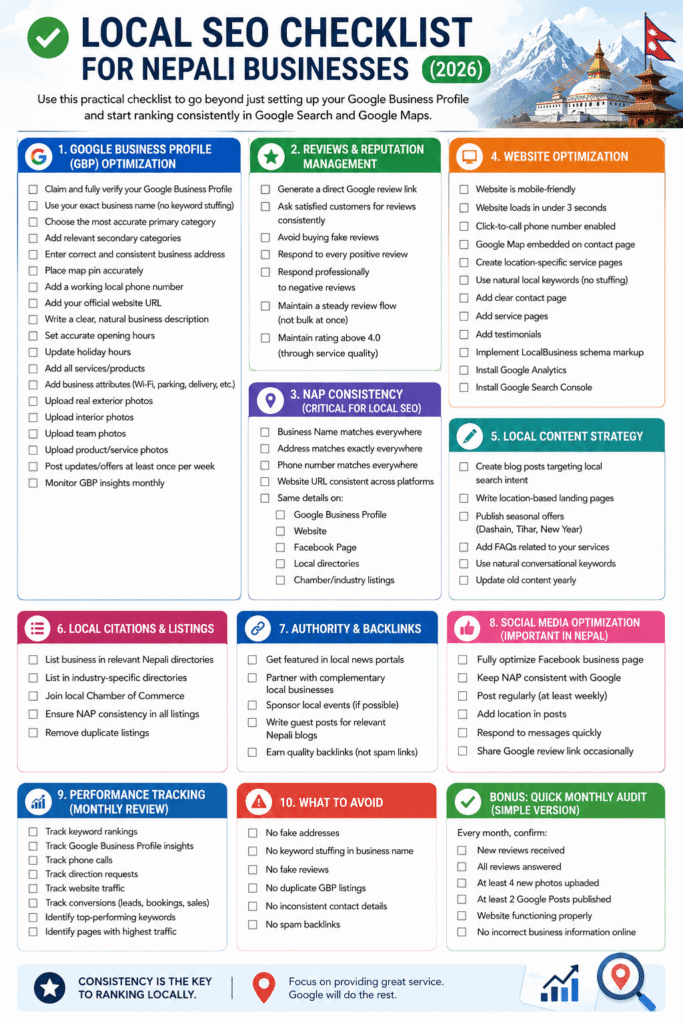
Local Seo Checklist File:
https://docs.google.com/spreadsheets/d/1Y5IY5B4clK4MrgNVEk_j2DZIZK95BQs_7aZFT23lCzg/edit?usp=sharing
Local SEO Checklist
Setting up is just the beginning. Optimization determines whether you rank.
1. Write a Clear Business Description
You get 750 characters to describe your business.
Include:
- What you offer
- Who you serve
- Your location
- Your experience
Example:
“We are a licensed trekking agency based in Kathmandu, Nepal, specializing in Everest Base Camp and Annapurna region treks. With experienced guides and personalized itineraries, we help travelers explore the Himalayas safely and responsibly.”
Keep it natural. Avoid promotional hype like “No.1 Best Guaranteed.”
2. Add High-Quality Photos
Businesses with photos receive more engagement, according to Google’s own guidance.
Upload:
- Exterior photos
- Interior photos
- Team photos
- Product images
- Real customer experiences
Use real images—not stock photos. Authenticity builds trust.
3. Set Accurate Business Hours
Clearly define:
- Opening hours
- Weekend hours
- Public holiday adjustments
Nothing frustrates customers more than arriving at a closed shop that Google says is open.
4. Collect and Respond to Reviews
Reviews are one of the strongest local ranking factors.
Encourage happy customers to leave honest reviews. You can:
- Share your review link via WhatsApp
- Send it via email
- Display a QR code in your shop
Always respond professionally, even to negative reviews.
Example response tone:
“Thank you for your feedback. We’re sorry your experience didn’t meet expectations. Please contact us directly so we can improve.”
Professional responses build credibility.
5. Use Google Posts
Google Posts allow you to publish:
- Offers
- Events
- Announcements
- New products
For example:
- “Dashain Special Discount – 15% Off”
- “New Trekking Package for 2026 Season”
Posting regularly signals activity and engagement.
Common Mistakes to Avoid
Many businesses in Nepal unknowingly damage their local SEO. Avoid these:
1. Keyword Stuffing in Business Name
Violates Google guidelines and risks suspension.
2. Using Fake Addresses
Google cross-checks data. Suspensions are difficult to reverse.
3. Ignoring Reviews
No replies = low engagement signal.
4. Inconsistent NAP Information
NAP = Name, Address, Phone Number.
Keep it consistent everywhere online.
How Long Does It Take to See Results?
Typically:
- Profile visibility: Immediately after verification
- Ranking improvements: 2–8 weeks (depending on competition)
- Strong local presence: 2–6 months with consistent optimization
Local SEO is not instant—but it compounds over time.
Is Google Business Profile Really Free?
Yes. Creating and managing a Google Business Profile is free.
However, Google also offers paid advertising through Google Ads, which is separate from GBP.
Do not pay random agencies claiming you must “pay Google” to appear in Maps. That’s misleading.
Final Thoughts: Should Every Business in Nepal Set Up Google Business Profile?
Absolutely—if you serve local customers.
From small tea shops to large hotels, from medical clinics to IT companies, a verified and optimized Google Business Profile is now a necessity, not an option.
It improves:
- Local search visibility
- Customer trust
- Brand credibility
- Foot traffic and inquiries
And in 2026, as digital competition in Nepal increases, businesses without a strong local SEO foundation will struggle to compete.
If you haven’t set up your Google Business Profile yet, now is the time.
Because when someone searches for your service tomorrow, you should be the business they find.
